Archaeo-Tech: LIDAR

Students build a miniature landscape in a sandbox and use tools to measure elevations at various points. By converting these measurements and coloring a graph, they create a 2D elevation model similar to those produced by LIDAR technology used in archaeology and other fields.
Lesson Created By: MegGaillard
Lesson Partners: South Carolina Department of Natural Resources
Essential Question
How can scientists use remote sensing technologies like LIDAR to create detailed elevation models of landscapes, and how can these models be used to study and understand the world around us?
Grade(s):
- 8
Subject(s):
Recommended Technology:
Other Instructional Materials or Notes:
Materials
• Sandbox LIDAR Lesson and Worksheet (1 for every student)
• Lab Equipment:
o Large Clear Plastic Boxes (1 for every group)
o Sand (enough to fill every box halfway)
o Small decorative props (like LEGO ®, Monopoly ® Houses & Hotels,
Miniature Plastic Trees, small rocks)
o Graph paper (1 piece of graph paper for every group)
o String (2 pieces of string for every group; the string needs to be long
enough to stretch across the top of the plastic box)
o Line Level (or String Level) (1 for every group; this will be used to make
sure the students are level when taking measurements)
o Ruler (1 for every group)
o Markers or Colored Pencils
Lesson Progression
- Prepare the required materials for the activity before beginning the lesson.
o Sandboxes should be of a uniform size. Using a ruler, mark equal intervals of measurement on the lip of the box. Students will use these markings to
guide themselves when measuring distances from the top of the box to the sand. Note that smaller units of measurement will yield more detailed elevation models. Students can complete this step during the activity if desired.
o Create a two-dimensional graph that corresponds to the width and length of the plastic box. Have the box’s width be the y-axis and the length be the x-axis. The graph should be large enough to write measurements at each point. It is also recommended to use light ink or a pencil when creating the
graph because students will color in their graphs at the end of the activity to produce their elevation models. Alternatively, students can use the graph paper from the worksheet to create their own graphs.
o Fill each sandbox halfway with sand and give each box a few props to decorate with.
o Give each group the necessary tools specified in the Materials section under “Lab Equipment”.
o Print copies of the Sandbox LIDAR Lesson and Worksheet. - Begin the lesson by reviewing what your students have learned about light waves so far. Answer any questions students might have about the behavior and properties of light.
- Demonstrate the differences between ordinary light and laser light with a flashlight and laser pointer. Ask you students to brainstorm how these devices
use light waves in different ways. - Shine the flashlight on a wall or flat surface. Have your students give observations and make connections based on their knowledge of light waves. Then shine a laser pointer on a wall or flat surface. Have your students compare the laser pointer to the flashlight and hypothesize why it is different.
- Explain to your students that the term laser is an acronym, standing for “Light Amplification by Stimulated Emission of Radiation”. Discuss the science behind lasers and how they differ from other applications of light waves.
- Ask your students to give examples of technology or jobs that use lasers. Encourage students to consider how often they interact with lasers in their daily lives. Explain that in the field of archaeology, the scientific study of past humans and cultures, lasers are used in a remote sensing method called LIDAR. Reference background information linked in the resources tab.
- Show your class the Archaeo-Tech: LIDAR short film (linked in the resources tab). After the film, answer any questions students might have about LIDAR or archaeology.
- Tell your students that they will be conducting a “miniature LIDAR survey” where they will collect elevation data from a sandbox. With their data, they will create a 2D elevation model that is akin to real-life maps produced by LIDAR data.
- Distribute copies of the “Sandbox LIDAR” Lesson and Worksheet and divide the class into groups of five to six students. Each group will need two pairs of students to hold the x-axis and y-axis string level across the top of the box, and another student to take measurements of the distance from the string to the sand (which represents the elevation of the airplane).
- Give an overview of the activity. Students can follow along in their worksheet.
o Tell your students that the sandboxes are miniature landscapes and they will be mapping the elevations of their landscape using a method that is similar to the way aerial LIDAR data is collected.
o Have your students create undulations in the sand, creating areas of higher and lower elevation. Students can decorate their landscape using small props, like miniature plastic trees, monopoly pieces, or LEGOS. These props can represent anything, like buildings, archaeological sites, or forests.
o When their miniature landscapes are ready, have your students measure the dimensions of their sandbox. If you have not done so prior to starting the lesson, have your students mark equal intervals of measurement on the lip of the box using a washable pen or marker. Explain that the smaller the unit of measurement is, the more accurate their elevation model will be.
o Using the box’s length as the x-axis and the width as the y-axis, have your students create a chart that corresponds to their unit of measurement (see example below). Explain that at each point on the graph they will be writing the distance from the string (which represents the altitude of their airplane, as well as latitude and longitude) to the surface of the sand or prop. - Have your students complete the activity by taking measurements at uniform intervals and recording data on the graph paper. Reference the examples linked in the resources tab.
- After students have finished collecting their data, have them convert their measurements from distance to elevation. Students can do this by subtracting the distance from the altitude (the height of the string or the height of the box). For this activity we will consider the bottom of the box to be sea level.
- Have students find their lowest elevation point, their highest elevation point and the range of their elevations.
- Tell your students that they will be coloring in their charts to produce an elevation model, like the maps produced by LIDAR. Have dark blue represent the lowest elevations, and transition from blue to green to yellow to orange to red, with red representing the highest elevations (see example on next page).
- Have your students create their elevation models. Instruct them to first color in the points they took measurements from and then fill in the blank space. If using crayons or colored pencils, students can create a smooth gradient between the different colors.
- When finished, have students compare their elevations models as a class. Which models are more accurate than others? Why? What would happen if you doubled the number of points you took?
- Discuss LIDAR as a remote sensing technique and show your students real examples of digital elevation models, point clouds, or other models produced
from LIDAR data. Have them compare their models to real ones. Ask what their models might look like if they were three-dimensional and not 2D.
Teacher Notes
Before starting this lesson, students should be familiar with the scientific definition of waves, the electromagnetic spectrum, and the properties of light waves.
extension: Have students conduct further research into how LIDAR is used in the real world. See example linked in the resources tab.
differentiation: Create a data collection sheet with a pre-drawn mini-grid representing the sandbox (matching the pre-marked points) and prompts for each point. For example, each square could have a prompt like "Measure distance to sand here. Record result." This guides struggling students through the data collection process step-by-step.
Background Information
Reference during the whole group portion of the lesson. Includes key vocabulary terms.
View ResourceLiDAR Video
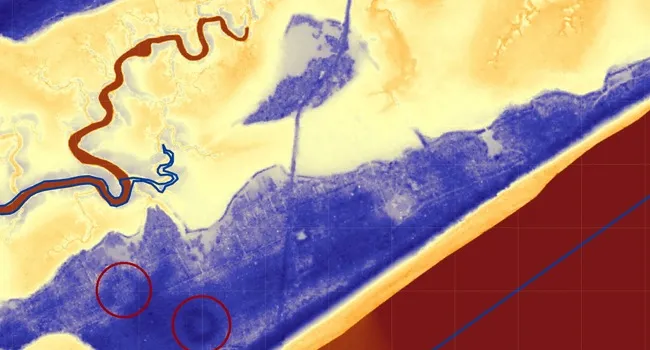
LiDAR (Light Detection and Ranging) is an aerial 3D laser scanning method. It has been used to identify archaeological sites around the world, including the Pockoy Island Shell Rings in 2017.
View ResourceOptional Extension Article
Have your students read this article from National Geographic about how archaeologists found Mayan ruins in the jungles of Belize and Guatemala using LIDAR.
View ResourceStandards
- 8-PS4-1 Using mathematical representations, describe a simple model for waves that includes how the amplitude of a wave is related to the energy in a wave.
- 8.1.CC Analyze the changes and continuities of the Native Americans' experiences prior to and as a result of settlement and colonization.
- This indicator was developed to encourage inquiry into Native American civilizations and cultures prior to European contact and their interactions with Europeans during the period of settlement and colonization, including their efforts to preserve their cultures.
- 8.1.E Utilize a variety of primary and secondary sources to examine multiple perspectives and influences of the economic, political, and social effects of South Carolina’s settlement and colonization on the development of various forms of government across the colonies.
- RL.RC Range and Complexity
- 6-PS4-2 Develop and use a model to describe that waves are reflected, absorbed, or transmitted through various materials